Controls
NXSand is Joy-Con first on Switch and mouse + keyboard on desktop. Face buttons use Nintendo naming (A/B/X/Y) via switch_face.hpp, not positional SDL button indices on switch-sdl2.
In play
| Action | Input |
|---|---|
| Paint | A or ZR |
| Erase | B or ZL |
| Brush size | L / R |
| Material ring | X |
| Quick save | Y |
| Menu | + |
| Move brush | Left stick / D-pad |
| Action | Input |
|---|---|
| Paint | Space or left mouse |
| Erase | Shift or right mouse |
| Brush size | [ / ] or mouse wheel |
| Material ring | H or Tab |
| Quick save | F5 |
| Menu | Esc |
| Move brush | WASD, arrows, or mouse over the sandbox |
Menus
- Navigate lists with D-pad / stick / arrows; confirm with A (Switch) or Enter (desktop); back with B or Esc.
- On slider rows in Engine Settings and Element Settings, hold D-pad or arrow keys to repeat adjust (
menu_repeat). Toggle rows change one step per press. - Material selection uses the ring wheel only (no grid picker, no digit hotkeys).
Touch (desktop)
Pointer coordinates map through queryDrawableSize and PlayRegion into grid space, same as the software cursor.
Optional Switch env
| Variable | Effect |
|---|---|
NXSAND_SWITCH_SWAP_FACE_XY |
Swaps ring face buttons X/Y |
Input → GPU brush
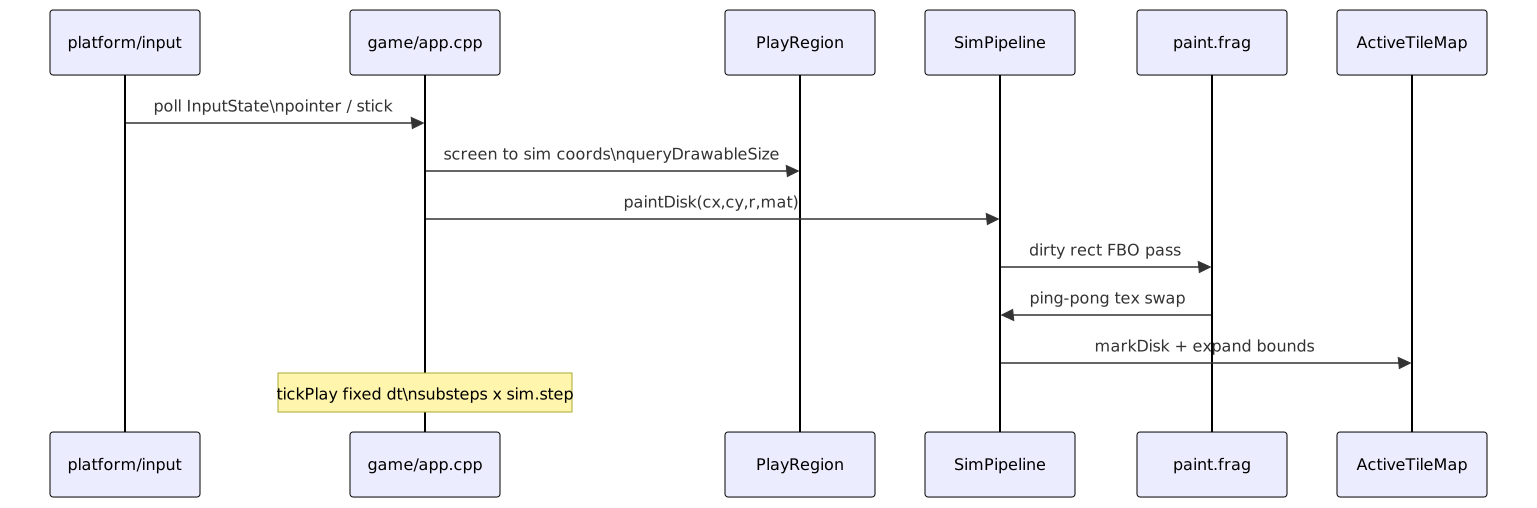
See Architecture for drawable size, orientation, and PlayRegion layout.