NXSand Architecture
Online docs
This page is part of the NXSand documentation site.
NXSand is a GPU-first falling-sand sandbox for Nintendo Switch and desktop: SDL2 owns the window and input; simulation, menus, HUD, and presentation are custom OpenGL ES (no ImGui, no SDL_Renderer for game UI).
Deeper references:
- Diagram catalog:
DIAGRAMS.mdanddiagrams/README.md - Physics and materials:
PHYSICS.md - Build and deploy:
NATIVE.md
Source layout
| Directory | Role |
|---|---|
source/platform/ |
Switch/desktop bootstrap, romfs checks, fatal screen |
source/platform/input/ |
SDL/libnx → InputState, Joy-Con face mapping |
source/platform/audio/ |
Procedural feedback tones (Switch audout, desktop SDL audio); UI edges + gunpowder/TNT detonation via sim_fx |
source/game/ |
App scene loop, settings, sim tick, render orchestration |
source/gpu/ |
SimPipeline, RenderPipeline, font atlas, perf timers, active tiles |
source/sim/ |
Material IDs, PhysicsParams, CPU reference (tests only) |
source/ui/ |
Menu/HUD GPU quads, material ring, perf overlay |
source/save/ |
JSON slots, settings.json, physics.json, migration |
shaders/ |
sim.frag / sim.comp, paint.frag, palette_lookup.frag, UI shaders |
See also: diagrams/source-modules.svg.

Application loop
App::frame (in source/game/app.cpp) drives every frame:
queryDrawableSize— orientation-aware drawable size for UI and input.- Optional dynamic resolution preset changes on Switch when frame time drifts.
tickMenuortickPlaydepending onScene::MenuvsScene::Play.renderFrame— world draw then UI, thenSDL_GL_SwapWindow.
Play mode (tickPlay) uses fixed 60 Hz sim accumulation with clamped substeps and catch-up caps. When Active tiles is Stable or Fast and no tiles are active for 30 frames, sim.sleeping skips GPU steps (including compute dispatches) until paint or load wakes the grid. With Active tiles Off, sleep applies only when the grid is empty.
Scene flow: diagrams/game-scenes.svg.

GPU simulation
SimPipeline owns a ping-pong pair of GL_R8UI textures and FBOs.
| Stage | Shader / API | Notes |
|---|---|---|
| Brush | paint.frag |
Dirty-rect stamp; marks active tiles on CPU |
| Step | sim.frag × 4 or sim.comp |
Margolus phases (0,0), (1,0), (0,1), (1,1) |
| Tunables | PhysicsBlock UBO |
physics_gpu.hpp ← PhysicsParams / physics.json |
| Sample | syncSimForSampling |
Barrier before palette read |
Fragment path scissors to merged active tile row-runs (Conservative/Aggressive modes), and compute dispatches matching clipped row-runs with 16×16 work groups (uDispatchOrigin / uDispatchLimit). Both paths preserve inactive cells with a read-to-write blit and fall back to full-grid work only when active coverage is too large or no valid active region exists. When active tile count is zero, GPU steps are skipped until idle sleep arms or the brush wakes tiles.
Substep detail: diagrams/sim-margolus-step.svg. Full frame graph: diagrams/sim-pipeline.svg.


GPU presentation
After sim sampling, RenderPipeline::drawSimulation presents the sim: by default palette_lookup.frag draws directly into the play region (nearest upscale). When Engine → Visuals → Upscale filter is not nearest, or Bloom is Low, palette renders at sim resolution into lookTex. With bloom, bloom_bright.frag (sim/8) → bloom_blur.frag (four passes at sim/16) → bloom_composite.frag (exposure/gamma/saturation) into postTex, then upscale.frag (or nearest blit) into the play region. Without bloom but with a non-nearest upscale filter, upscale.frag filters lookTex directly. UI draws batched quads and the FreeType atlas on top (HUD, material wheel, menus, perf overlay).
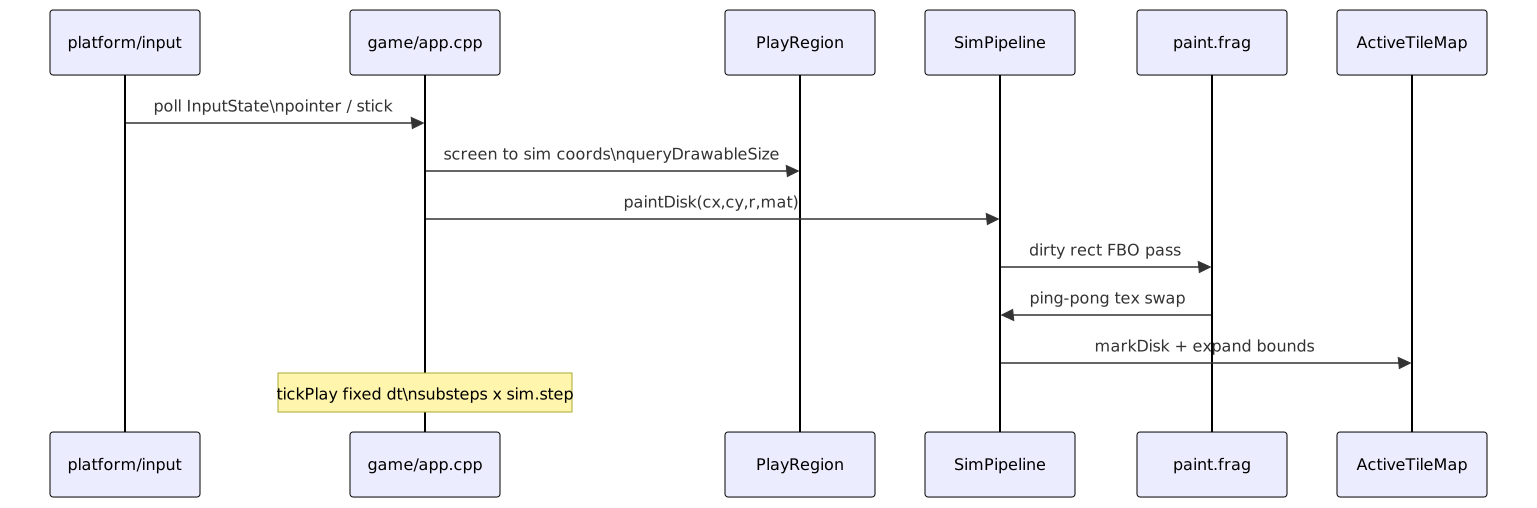
Brush coordinate path: screen → PlayRegion → grid, using the same drawable size as layout. See diagrams/brush-input-flow.svg.
Persistence
Three slots under sdmc:/switch/nxsand/ (desktop: ./nxsand_save/). Each slot JSON stores version, dimensions, base64-encoded grid, brush state, and timestamp. Save readbacks the GPU grid, flips rows to top-down, then atomically writes the file. Load decodes and uploadGridTopDown, then restores brush and wakes the sim.
Sequence: diagrams/save-load-flow.svg.
Settings split:
settings.json— engine, display, performance,visuals(palette mode, AO, bloom, flicker, grain, upscale filter), controls, accessibility, debug (settings_io.cpp). On load, missingvisuals.flickerdefaults to off; enum fields are clamped; legacyrenderobject is read ifvisualsis absent.physics.json— per-element tunables (Element Settings)
Playable materials (20 brush IDs + spawn-only ember/flower): sand, water, fire, smoke, wall, acid, plant, lava, stone, oil, ice, steam, glass, wood, metal, gunpowder, coal, TNT, salt, brick — see PHYSICS.md and diagrams/material-reactions.svg.

Core types (simplified)
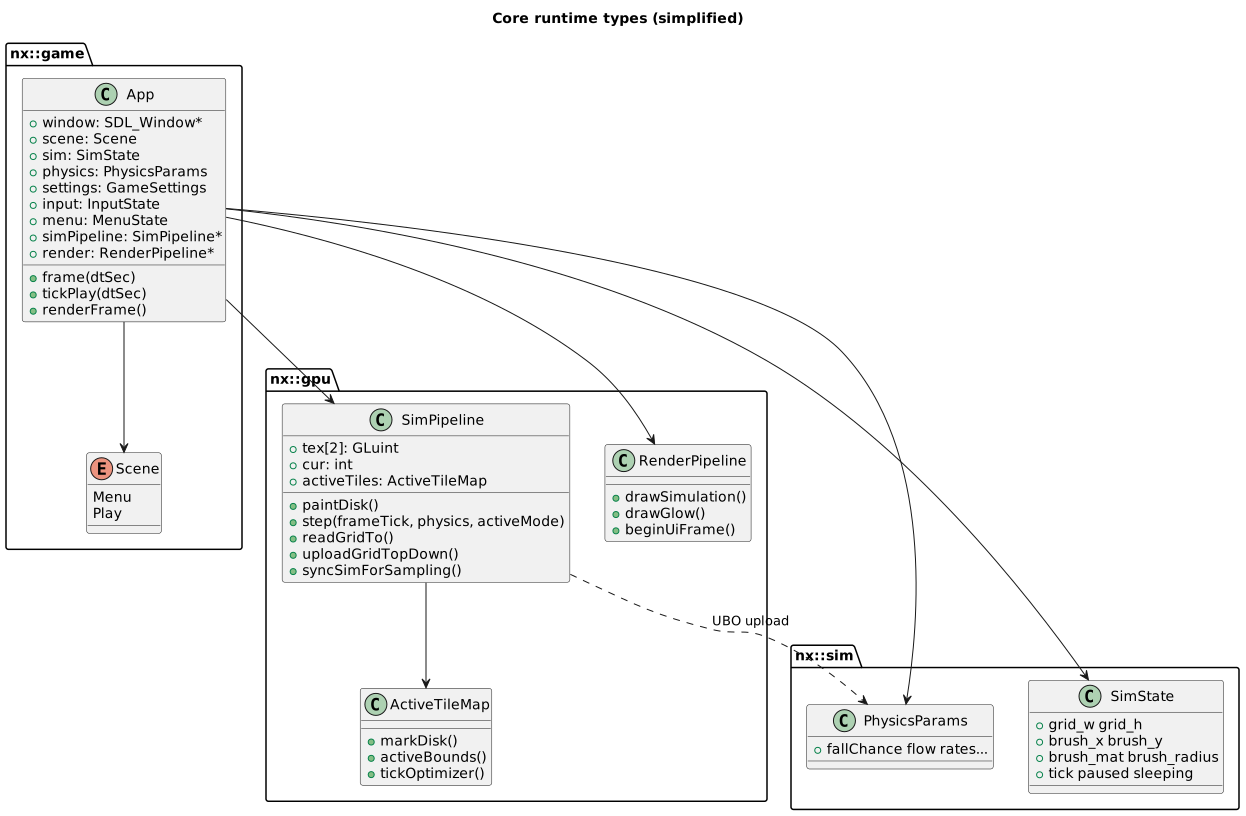
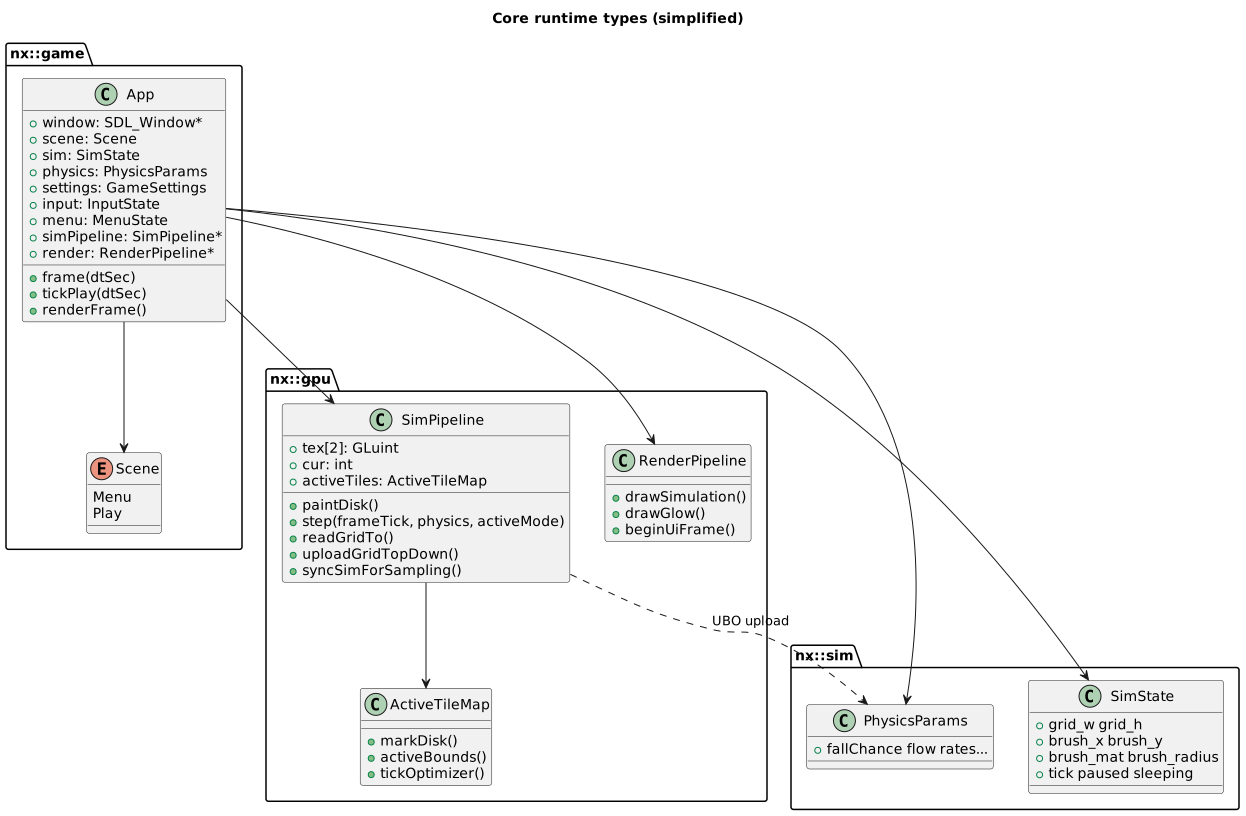
diagrams/core-runtime-classes.svg shows how App owns SimPipeline, RenderPipeline, SimState, and PhysicsParams.
Material logic
Margolus rules and neighbor reactions live in shaders/sim_common.glsl (included by sim.frag and sim.comp). Overview graphs:
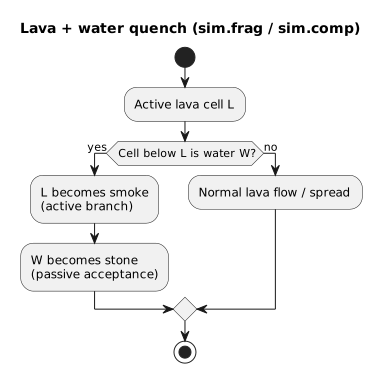
Regenerate those when reaction branches change; keep PHYSICS.md tables in sync.
Performance defaults (Switch)
- Boot sim size: Battery Saver 480×270; Balanced 640×360 when dynamic resolution upgrades.
- Substeps: 1–2 via
effectiveSubsteps. - Active tiles: Off by default; idle sleep when active tile count is zero (settled matter allowed). Conservative/Aggressive optional in Engine settings. Active tiles Off sleeps only on an empty grid.
- Do not default 1280×720 sim on handheld OLED.
See docs/SWITCH_PERF_MATRIX.md when tuning shader or pass count.