PlantUML prompts and SVG
Use this track when you want UML-style diagrams (classes, sequences, activities, use cases) rendered by PlantUML through Kroki. For syntax details and more examples, see UML (PlantUML).
Prerequisites
- A connected UML-MCP server (Getting started).
- Optional: a Sequential Thinking MCP server in the same client (for example Cursor) if you want explicit multi-step reasoning before calling
generate_uml. It is not part of UML-MCP; it complementsuml_diagram_with_thinking, which is a named prompt on UML-MCP only.
Natural-language prompts (copy-paste)
Ask your assistant in plain language, then let it fetch uml://types / uml://workflow and call tools:
Draw a PlantUML class diagram for a small library: Book, Copy, Member, Loan.
Book has title and isbn. Member has id and name. Loan links a Member to a Copy with dueDate.
A Book has many Copies. A Member can have many active Loans.
Produce a PlantUML sequence diagram: Client calls POST /orders, API validates payload,
writes to Orders DB, publishes OrderCreated to a message queue, returns 201 with order id.
Include alt: validation failure returns 400.
Activity diagram (PlantUML): start, read config file, if valid parse else show error,
if parse ok run pipeline then end; on pipeline error log and end.
Use case diagram: Actor Librarian manages catalog; Actor Member searches and borrows;
system boundary LibrarySystem; include relationship SearchCatalog from Borrow to Search.
Example Sequential Thinking flow (then generate_uml)
Illustrative steps you might run through the Sequential Thinking tool before generating:
- Scope: Static structure only (classes + associations), no sequence.
- Notation: PlantUML
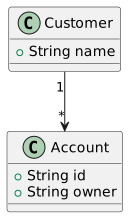
classwith@startuml/@enduml, visibility optional. - Entities: Account, Customer, one-to-many Customer to Account.
- Risks: Avoid ambiguous navigability; name associations clearly.
- Validation: Call
validate_umlwithdiagram_type: classand the same source, thengenerate_umlwith"output_format": "svg".
Then call generate_uml with diagram_type set to a PlantUML-backed type (for example class, sequence, or raw plantuml), your final source as code, "output_format": "svg", and omit output_dir (or set it to null) if you only need a URL or content_base64 without writing a file.
Named MCP prompts (UML-MCP)
| Prompt | Use when |
|---|---|
uml_diagram | Generic plan-then-generate for any supported type. |
uml_diagram_with_thinking | Same, with an explicit planning step before code. |
class_diagram | Class diagram from prose. |
sequence_diagram | Sequence diagram from prose. |
activity_diagram | Activity / workflow from prose. |
usecase_diagram | Use case diagram from prose. |
Fetch text with prompts/get (see MCP prompts).
Direct tools/call (JSON-RPC)
Minimal example for the diagram below (same source as the committed SVG):
{
  "jsonrpc": "2.0",
  "id": 1,
  "method": "tools/call",
  "params": {
    "name": "generate_uml",
    "arguments": {
      "diagram_type": "class",
      "output_format": "svg",
      "code": "@startuml\nclass Account {\n  +String id\n  +String owner\n}\nclass Customer {\n  +String name\n}\nCustomer \"1\" --> \"*\" Account\n@enduml"
    }
  }
}
Example output (server-rendered SVG)
This asset was produced with UML-MCP generate_uml (diagram_type: class, output_format: svg) and the same code as above.