BPMN prompts and SVG
Use this track when you want BPMN 2.0 process models as XML rendered to SVG through Kroki (diagram_type: bpmn). For a compact element and flow reference, see the BPMN guide. For minimal XML syntax, see BPMN (Kroki XML).
Prerequisites
- A connected UML-MCP server (Getting started).
- Optional: a Sequential Thinking MCP server in the same client if you want explicit multi-step reasoning before calling
generate_uml. It is not part of UML-MCP; it complementsuml_diagram_with_thinking, which is a named prompt on UML-MCP only.
Natural-language prompts (copy-paste)
Ask your assistant in plain language, then let it load uml://templates (key bpmn), uml://examples (key bpmn) if helpful, and call generate_uml with diagram_type: bpmn:
Model a change approval in BPMN 2.0 XML: start, submit change request, exclusive gateway "needs manager approval?",
if no go straight to apply task and end applied; if yes manager review task, then exclusive gateway for approved vs rejected,
approved merges to apply then end applied, rejected ends at a separate end event. Include BPMN-DI shapes and edges so Kroki can lay it out.
BPMN XML for employee onboarding: parallel gateway after "documents received" so HR runs background check and IT provisions accounts in parallel,
then an inclusive join before a single "ready to start" task and end. Use pools only if I need two participants; otherwise one pool with lanes for HR and IT.
Two-pool BPMN handoff: Customer pool with "send order" message flow to Supplier pool "receive order" and sequence flows inside each pool. Keep it minimal and executable.
Single pool with two lanes (Requester, Approver): task submit in Requester lane, gateway and approve task in Approver lane, apply back in Requester lane. Output BPMN 2.0 XML with DI.
Example Sequential Thinking flow (then generate_uml)
- Scope: Happy path plus one rejection branch; one or two exclusive gateways.
- Notation: BPMN 2.0 XML with
bpmn:andbpmndi:namespaces; add BPMNDiagram so layout is stable in Kroki. - Elements: Stable IDs on
sequenceFlowlinks; gateway outgoing flows named where it helps readers. - Risks: Missing DI often still renders for tiny models; for branching processes, include
BPMNShapeandBPMNEdgewaypoints. - Validation: Call
validate_umlwithdiagram_type: bpmnand the samecode, thengenerate_umlwith"output_format": "svg"; omitoutput_dirif you only need a URL orcontent_base64.
Named MCP prompts (UML-MCP)
| Prompt | Use when |
|---|---|
uml_diagram | Generic plan-then-generate for any supported type (steer toward bpmn in context). |
uml_diagram_with_thinking | Same, with an explicit planning step before XML. |
bpmn_process_guide | Explain BPMN elements and flow rules (BPMN 2.0.2); pairs with uml://templates / uml://examples (bpmn) and the BPMN guide. |
bpmn_executable_process | Produce minimal executable BPMN 2.0 XML (start, tasks, gateways, end, sequenceFlow). |
Fetch text with prompts/get (see MCP prompts).
Direct tools/call (JSON-RPC)
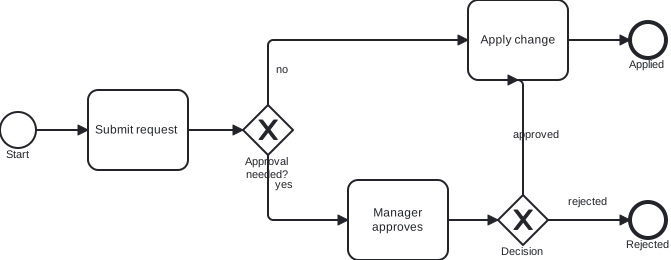
Minimal example for the diagram below (same code as the committed SVG): BPMN ApprovalProcess with two exclusive gateways (approval needed?, then outcome), Apply change, and two end events.
{
  "jsonrpc": "2.0",
  "id": 1,
  "method": "tools/call",
  "params": {
    "name": "generate_uml",
    "arguments": {
      "diagram_type": "bpmn",
      "output_format": "svg",
      "code": "<?xml version=\"1.0\" encoding=\"UTF-8\"?>\n<bpmn:definitions xmlns:bpmn=\"http://www.omg.org/spec/BPMN/20100524/MODEL\"\n                  xmlns:bpmndi=\"http://www.omg.org/spec/BPMN/20100524/DI\"\n                  xmlns:dc=\"http://www.omg.org/spec/DD/20100524/DC\"\n                  xmlns:di=\"http://www.omg.org/spec/DD/20100524/DI\"\n                  id=\"Definitions_Tutorial\"\n                  targetNamespace=\"http://uml-mcp/tutorial/bpmn\">\n  <bpmn:process id=\"ApprovalProcess\" isExecutable=\"true\">\n    <bpmn:startEvent id=\"StartEvent_1\" name=\"Start\"/>\n    <bpmn:task id=\"Task_Submit\" name=\"Submit request\"/>\n    <bpmn:exclusiveGateway id=\"Gateway_ApprovalNeeded\" name=\"Approval needed?\"/>\n    <bpmn:task id=\"Task_Manager\" name=\"Manager approves\"/>\n    <bpmn:exclusiveGateway id=\"Gateway_Outcome\" name=\"Decision\"/>\n    <bpmn:task id=\"Task_Apply\" name=\"Apply change\"/>\n    <bpmn:endEvent id=\"End_Applied\" name=\"Applied\"/>\n    <bpmn:endEvent id=\"End_Rejected\" name=\"Rejected\"/>\n    <bpmn:sequenceFlow id=\"Flow_Start_Submit\" sourceRef=\"StartEvent_1\" targetRef=\"Task_Submit\"/>\n    <bpmn:sequenceFlow id=\"Flow_Submit_Gw1\" sourceRef=\"Task_Submit\" targetRef=\"Gateway_ApprovalNeeded\"/>\n    <bpmn:sequenceFlow id=\"Flow_Gw1_Apply\" name=\"no\" sourceRef=\"Gateway_ApprovalNeeded\" targetRef=\"Task_Apply\"/>\n    <bpmn:sequenceFlow id=\"Flow_Gw1_Manager\" name=\"yes\" sourceRef=\"Gateway_ApprovalNeeded\" targetRef=\"Task_Manager\"/>\n    <bpmn:sequenceFlow id=\"Flow_Manager_Gw2\" sourceRef=\"Task_Manager\" targetRef=\"Gateway_Outcome\"/>\n    <bpmn:sequenceFlow id=\"Flow_Gw2_Apply\" name=\"approved\" sourceRef=\"Gateway_Outcome\" targetRef=\"Task_Apply\"/>\n    <bpmn:sequenceFlow id=\"Flow_Gw2_Rejected\" name=\"rejected\" sourceRef=\"Gateway_Outcome\" targetRef=\"End_Rejected\"/>\n    <bpmn:sequenceFlow id=\"Flow_Apply_End\" sourceRef=\"Task_Apply\" targetRef=\"End_Applied\"/>\n  </bpmn:process>\n  <bpmndi:BPMNDiagram id=\"BPMNDiagram_1\">\n    <bpmndi:BPMNPlane id=\"BPMNPlane_1\" bpmnElement=\"ApprovalProcess\">\n      <bpmndi:BPMNShape id=\"Shape_Start\" bpmnElement=\"StartEvent_1\">\n        <dc:Bounds x=\"132\" y=\"232\" width=\"36\" height=\"36\"/>\n      </bpmndi:BPMNShape>\n      <bpmndi:BPMNShape id=\"Shape_Submit\" bpmnElement=\"Task_Submit\">\n        <dc:Bounds x=\"220\" y=\"210\" width=\"100\" height=\"80\"/>\n      </bpmndi:BPMNShape>\n      <bpmndi:BPMNShape id=\"Shape_Gw1\" bpmnElement=\"Gateway_ApprovalNeeded\" isMarkerVisible=\"true\">\n        <dc:Bounds x=\"375\" y=\"225\" width=\"50\" height=\"50\"/>\n      </bpmndi:BPMNShape>\n      <bpmndi:BPMNShape id=\"Shape_Manager\" bpmnElement=\"Task_Manager\">\n        <dc:Bounds x=\"480\" y=\"300\" width=\"100\" height=\"80\"/>\n      </bpmndi:BPMNShape>\n      <bpmndi:BPMNShape id=\"Shape_Gw2\" bpmnElement=\"Gateway_Outcome\" isMarkerVisible=\"true\">\n        <dc:Bounds x=\"630\" y=\"315\" width=\"50\" height=\"50\"/>\n      </bpmndi:BPMNShape>\n      <bpmndi:BPMNShape id=\"Shape_Apply\" bpmnElement=\"Task_Apply\">\n        <dc:Bounds x=\"600\" y=\"120\" width=\"100\" height=\"80\"/>\n      </bpmndi:BPMNShape>\n      <bpmndi:BPMNShape id=\"Shape_EndApplied\" bpmnElement=\"End_Applied\">\n        <dc:Bounds x=\"762\" y=\"142\" width=\"36\" height=\"36\"/>\n      </bpmndi:BPMNShape>\n      <bpmndi:BPMNShape id=\"Shape_EndRejected\" bpmnElement=\"End_Rejected\">\n        <dc:Bounds x=\"762\" y=\"322\" width=\"36\" height=\"36\"/>\n      </bpmndi:BPMNShape>\n      <bpmndi:BPMNEdge id=\"Edge_Flow_Start_Submit\" bpmnElement=\"Flow_Start_Submit\">\n        <di:waypoint x=\"168\" y=\"250\"/>\n        <di:waypoint x=\"220\" y=\"250\"/>\n      </bpmndi:BPMNEdge>\n      <bpmndi:BPMNEdge id=\"Edge_Flow_Submit_Gw1\" bpmnElement=\"Flow_Submit_Gw1\">\n        <di:waypoint x=\"320\" y=\"250\"/>\n        <di:waypoint x=\"375\" y=\"250\"/>\n      </bpmndi:BPMNEdge>\n      <bpmndi:BPMNEdge id=\"Edge_Flow_Gw1_Apply\" bpmnElement=\"Flow_Gw1_Apply\">\n        <di:waypoint x=\"400\" y=\"225\"/>\n        <di:waypoint x=\"400\" y=\"160\"/>\n        <di:waypoint x=\"600\" y=\"160\"/>\n      </bpmndi:BPMNEdge>\n      <bpmndi:BPMNEdge id=\"Edge_Flow_Gw1_Manager\" bpmnElement=\"Flow_Gw1_Manager\">\n        <di:waypoint x=\"400\" y=\"275\"/>\n        <di:waypoint x=\"400\" y=\"340\"/>\n        <di:waypoint x=\"480\" y=\"340\"/>\n      </bpmndi:BPMNEdge>\n      <bpmndi:BPMNEdge id=\"Edge_Flow_Manager_Gw2\" bpmnElement=\"Flow_Manager_Gw2\">\n        <di:waypoint x=\"580\" y=\"340\"/>\n        <di:waypoint x=\"630\" y=\"340\"/>\n      </bpmndi:BPMNEdge>\n      <bpmndi:BPMNEdge id=\"Edge_Flow_Gw2_Apply\" bpmnElement=\"Flow_Gw2_Apply\">\n        <di:waypoint x=\"655\" y=\"315\"/>\n        <di:waypoint x=\"655\" y=\"200\"/>\n        <di:waypoint x=\"650\" y=\"200\"/>\n      </bpmndi:BPMNEdge>\n      <bpmndi:BPMNEdge id=\"Edge_Flow_Gw2_Rejected\" bpmnElement=\"Flow_Gw2_Rejected\">\n        <di:waypoint x=\"680\" y=\"340\"/>\n        <di:waypoint x=\"762\" y=\"340\"/>\n      </bpmndi:BPMNEdge>\n      <bpmndi:BPMNEdge id=\"Edge_Flow_Apply_End\" bpmnElement=\"Flow_Apply_End\">\n        <di:waypoint x=\"700\" y=\"160\"/>\n        <di:waypoint x=\"762\" y=\"160\"/>\n      </bpmndi:BPMNEdge>\n    </bpmndi:BPMNPlane>\n  </bpmndi:BPMNDiagram>\n</bpmn:definitions>\n"
    }
  }
}
Example output (server-rendered SVG)
This asset was produced with Kroki via UML-MCP generate_uml (diagram_type: bpmn, output_format: svg) and the same code as above.